
Tap Dungeon Controls
A cursor, a skill strip, and event buttons — not an idle auto-battler.
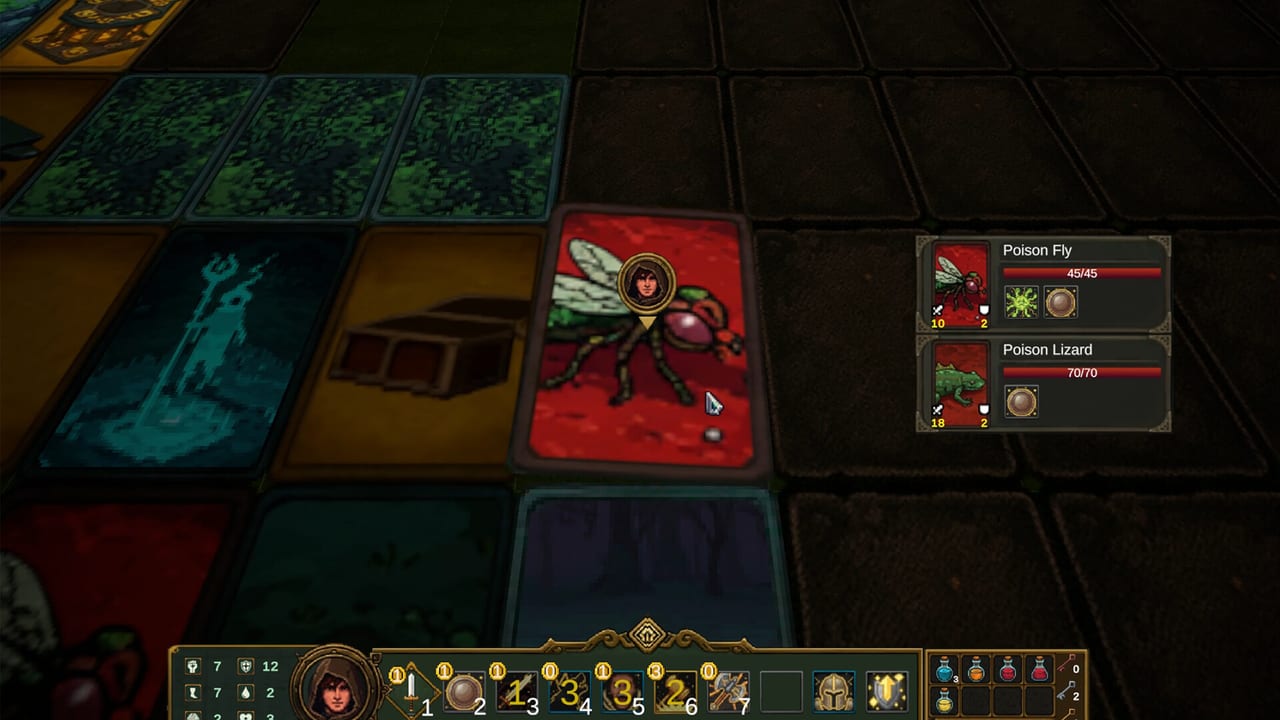
How you actually drive Tap Dungeon is the question this page answers. Xiao5 Studios has not posted a public English keybind table. Steam marks the title with a controller tag wizard, which usually means Steam Input is at least in the conversation. Official footage is mouse-cursor heavy. This page stays inside what we can see. Pair it with how to play for the loop and getting started for the first hour.
What the footage actually shows
The HUD in launch screenshots and the store trailer is consistent:
- A cursor over cards, event buttons, and loot popups.
- A numbered skill strip along the bottom (the filmed build labels slots 1–7).
- A portrait, HP bar, and a second resource bar.
- An inventory grid and a gold counter on the right.
- A settings cog in a corner.
- Choice columns that print costs in gold or hit points.
You tap a tile or a button. The game resolves a turn, an event, or a loot window. There is no evidence of a free WASD roam. If a later overlay adds keyboard shortcuts, it will be noted on updates. Until then, treat the mouse as the contract.
Cards, events, and loot popups
A card-maze floor is a grid. Click the tile you can afford. Official combat shots show enemy cards (poison fly, lizard, wolves, snakes) and a cursor sitting on the card you mean to resolve. Event screens put a painting on the left and two or more choices on the right — “Go to forest” versus “leave,” “fish gold and lose HP” versus walk away. Loot windows offer take-all versus skip. Mis-taps on a −30 HP option are not a graphics bug. Slow down on a laptop trackpad.
If the cursor is over a yellow cost, read it. The artifact notes walk the filmed gold pit, key pedestal, and beggar. Controls will not save you from a greedy click. They will only deliver the click you meant.
The skill strip
Combat screens show numbered skills lighting up. Official footage is turn-based: you pick a skill, the enemy answers, the HUD updates. Cycling 1–7 because they are lit is how you waste a potion on trash. Identify whether the room is a pack, an elite, or a floor lord, then spend the skill that matches the job. Details live on the combat guide. This page only needs you to know the strip is a menu, not a rhythm game.
Mouse versus gamepad
Steam flagged a controller tag wizard. That is not the same as a verified Steam Deck badge. Deck compatibility is still listed Unknown on the store snapshot we used. If your only stick is a pad, open Steam’s layout preview before you refund. Do not expect this wiki to invent an Xbox face-button map Xiao5 never published. If a community layout works for you, keep it in Steam, not here.
Laptop players should disable oversensitive tap-to-click if they keep confirming the wrong event line. A single extra millimetre of cursor travel is cheaper than a rebirth.
Settings, language, and Steam Input
Use the in-game cog for display and language. Twelve interface languages shipped. If the UI is a mix you did not ask for, change language in Steam properties, then confirm in the cog. Launch-week comments already grumbled about translation quality. That is a text problem, not a bind problem.
Steam Input can remap if the wizard exposed actions. We will not guess those action names. If a hotfix adds a bind screen, it belongs on the depot notes. Until then, the honest control sheet is: cursor, click, numbered skills, leave-is-a-button.
What not to copy from other crawlers
Do not paste a Darkest Dungeon WASD overlay. Do not paste an idle-clicker auto-hotkey. Tap Dungeon is a paid single-player Steam Windows roguelike. Scripts and Roblox layouts belong to other products that share English words. If a YouTube thumbnail promises “Tap Dungeon controls” and then shows a mobile idle hero collector, you opened the wrong game. This wiki will not embed a video ID we could not verify against Xiao5’s store trailer.
After the cursor feels boring
Boring is the point. You want the cursor to be invisible so the tooltip is the whole job. Then open dungeons for routing and builds for the kit. Hardware doubts: system requirements. Class doubts: class picker. Studio channels: links.
If you came here searching how to play on a controller, the honest sentence is: try Steam Input, expect a cursor, and keep a mouse nearby for event columns. If you came here searching how to play with a keyboard only, we do not have an official map. Click. Read. Leave. That is the control scheme until Xiao5 writes another one.
Frequently Asked Questions
Launch-week answers for new adventurers from the Duchy of Lyle.
Is there an official Tap Dungeon keybind list?
Not one we can cite. Footage is mouse-driven. Use the in-game cog and Steam Input rather than a fan overlay copied from another crawler.
Does Tap Dungeon support a controller?
Steam flagged a controller tag wizard. Steam Deck is still listed Unknown. Try Steam’s layout preview before you refund.
Why do I keep clicking the wrong event?
The right-hand column is the contract. Slow the cursor. Getting started walks the filmed gold-pit and key costs.
Where do I go after this page?
The combat guide for the skill strip in a fight, then how to play for the floor loop.